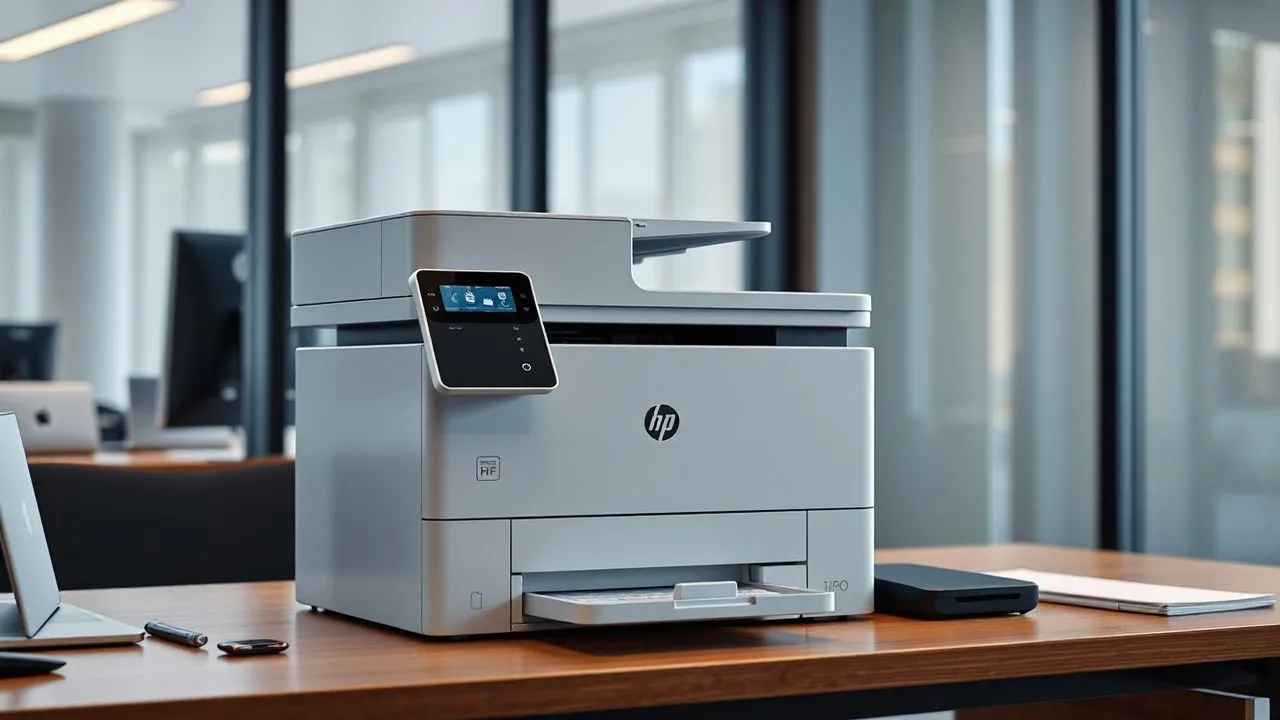
In the technological landscape of April 2026, document management has reached extraordinary efficiency levels, yet the need for high quality paper supports remains a fundamental pillar for every professional reality that respects. The Review HP Color LaserJet Pro 3302fdw that you learn to read comes from the need to analyze a device that promises to redefine color laser printing standards for small offices and dynamic work teams. In an era dominated by boosted digitalization, having a multifunction printer that can combine extreme speed, enterprise-grade cybersecurity and real environmental sustainability is not a luxury, but an operational need. HP designed this model to meet exactly these challenges, integrating proprietary technologies such as new TerraJet toners and Wolf Pro Security protection system. During our in-depth tests, we tried to understand whether this device is really able to support the frenetic rhythms of a modern office, where the printing of contracts, graphic reports and accounting documents must take place smoothly technical. The HP Color LaserJet Pro 3302fdw comes as a compact but extremely powerful solution, able to manage important workloads with a disarming ease of use, facilitated by an intuitive touchscreen interface and perfect integration with the mobile ecosystem through the dedicated application, making it a reference point in the field of professional laser peripherals.
HP Multifunction Design and Technical Characteristics
The first impact with the HP Color LaserJet Pro 3302fdw reveals a constructive care that is typical of the HP professional line. With dimensions of about 42 x 42 x 34 cm and a weight that slightly exceeds 17 kg, this printer fits perfectly on an office desk or in a dedicated corner, occupying a space contained compared to its actual output potential. The design is clean, dominated by square lines and an opaque print-resistant finish, ideal for intense daily use. The robustness of the shell suggests a durability over time that is essential for those who see the printer as a long-term investment and not only as a temporary accessory. The provision of components is rational: the main supply tray is easily accessible, as well as the toner compartment, facilitating ordinary maintenance operations even for those who do not have specific technical skills.
User interface and digital management
The real heart of physical interaction with the machine is the 10.92 cm colour touchscreen. This panel is not only an aesthetic accessory, but a real control center that allows you to manage every function of the multifunctional laser color printer with extreme naturalness. The touch response is quick and precise, similar to that of a modern smartphone, avoiding those frustrations typical of old generation resistive displays. Through the menu, you can quickly configure scanning settings, manage the print queue or access copy functions without ever having to turn on your computer. Navigation is simplified by clear icons and a logical menu structure, which drastically reduces learning times for new users who approach the device for the first time in the office.
In addition to the physical panel, digital management is supported by a complete connectivity that includes dual-band Wi-Fi, Ethernet and USB. Wi-Fi technology with automatic reset functionality is a key technical detail in 2026, as it ensures that the printer remains online even in the presence of interference or instability of the local network. This means that workflows are never interrupted by trivial connection problems, allowing the team to focus exclusively on their production activities. The ability to print directly from USB flash drive or via Wi-Fi Direct adds an additional level of flexibility, making the HP Color LaserJet Pro 3302fdw an extremely versatile device in any professional scenario, from the small studio associated with the branch of a large company.
HP TerraJet print and technology performance
When evaluating a printer of this caliber, the performance as well is the main judgement meter. The HP Color LaserJet Pro 3302fdw does not disappoint, offering a print speed that reaches 25 pages per minute both for black and white documents. This chromatic balance is rare in devices of this price range and represents a huge competitive advantage for those who regularly produce presentations or internal marketing materials. The precision of the text is absolute, with characters defined even to the smallest dimensions, while the colour rendering benefits from an automatic calibration that ensures uniformity between the different printing sessions, eliminating those unpleasant fading effects that often afflict economic lasers after prolonged use.
Efficiency of toners and image quality
The secret behind the excellent visual quality lies in hP TerraJet technology. These new generation toners have been designed to offer a wider colour range and greater shine, while reducing the energy needed for the paper melting process. In our tests, graphics and infographics appeared vividly, with natural shaded transitions and a solid color cover. This is not just aesthetics: TerraJet technology allows the printer to warm up faster, reducing the output time of the first page to about 11 seconds. This means that even for single or urgent prints, you do not have to wait for long heating cycles, optimizing the dead times during the working day and improving the perception of reactivity of the entire office system.
Another fundamental aspect related to the TerraJet toners concerns their kilometric yield. Also available in high capacity version, these consumables allow to print up to 3,200 pages in black and 2,500 colors before replacement. This results in a management of laser printing costs extremely efficient, with a cost per competitive page that makes the 3302fdw ideal for monthly volumes between 1,500 and 2,500 pages. The reduction in energy consumption, estimated around 27% compared to previous models, is not only a benefit for the environment but also for the corporate budget, making the printer an example of how technological innovation can go hand in hand with economic and environmental sustainability in the context of 2026.
Smart functionality and integration with HP Smart App
The software ecosystem surrounding the HP Color LaserJet Pro 3302fdw is what transforms it from simple peripheral to true productivity hub. The HP Smart App is the core of this transformation, offering a unified interface that allows you to control every aspect of your printer from smartphone, tablet or PC. The application was further refined in 2026 to be lighter and responsive, allowing users to send documents in print while still on the go or scan files directly to popular cloud services such as Google Drive, Dropbox or SharePoint. The ease with which you can scan paper documents and turn them into searchable PDFs or editable files is surprising and drastically reduces the need for complex intermediate steps between hardware and software.
Automation with Smart Chips
One of the most popular features of professionals is the Shortcuts function (previously known as Smart Tasks). This feature allows you to create default workflows that can be activated with a single touch. For example, you can set a shortcut that scans a document, backups it on a business server and simultaneously sends it via email to the accounting department. This level of automation is essential for those who manage large volumes of invoices or contracts, since it eliminates human error and standardizes storage processes. The HP Color LaserJet Pro 3302fdw becomes a digital assistant who learns office habits and adapts to the specific needs of the team, improving the professional office productivity tangible and measurable since the first days of use.
Moreover, integration with mobile printing services such as Apple AirPrint and Mopria ensures that any guest or external collaborator can print necessary documents without installing complex drivers. This flexibility is vital in co-working spaces or modern offices where mobility is the norm. The printer manages the print queues intelligently, giving priority to the most urgent documents and providing real-time notifications on the state of consumables directly on the administrator's mobile devices. In this way, it is almost impossible to stay without toner or paper unexpectedly, since the system warns well in advance when it is necessary to intervene for supply, ensuring an operational continuity that is the trademark of professional products signed HP.
Business Security with HP Wolf Pro Security
In a context where cyber attacks on business infrastructure are increasingly frequent, the security of print peripherals cannot be neglected. HP Color LaserJet Pro 3302fdw integrates the package HP Wolf Pro Security, a multilevel defence solution that protects the device from the moment of ignition. Many companies underestimate the fact that an unprotected printer can serve as a gateway to the local network for malicious; HP solves this problem at the root with firmware integrity controls that prevent unauthorized code execution. Sensitive data protection is also guaranteed during transmission, thanks to advanced encryption protocols that secure documents while traveling from computer to printer through Wi-Fi or wired network.
Data protection and firmware privacy
The security system is not limited to preventing external attacks, but also includes features for managing internal privacy. Thanks to the PIN protected print, you can send a document to the printer but make it physically printed only when the authorized user enters their code on the touchscreen. This function is vital for managing pay envelopes, reserved contracts or medical data, ensuring that no sensitive document remains unattended on the exit tray. In 2026, compliance with data protection regulations (such as the evolved GDPR) requires precise tools, and the HP Color LaserJet Pro 3302fdw offers everything you need to be in order without having to invest in expensive and difficult third-party software to configure.
In addition to software protection, HP has implemented physical barriers at hardware level. The internal circuits are designed to detect tampering attempts, and the printer is able to auto-repair by restoring a secure copy of the original firmware in case of suspected corruption. This resilient approach to data security allows IT managers to sleep quietly, knowing that the printer fleet does not represent a weak link in the company’s defensive chain. Centralized security management through HP Web Jetadmin also allows you to monitor the protection status of multiple devices at the same time, facilitating security updates and distribution of company policies on all network nodes with few clicks, making proactive maintenance and not only responsive.
Configuration and installation wizard in 2026
One of the historical obstacles to the adoption of new multifunction printers has always been the complexity of the initial configuration. HP has knocked down these barriers with a setup process that, in 2026, became almost entirely automated. Once extracted from the package, the wi-Fi printer configuration takes place in a few steps guided directly from the smartphone screen or the integrated touch panel. You no longer need to manually insert endless code strings or configure drivers via old CDs; the system automatically recognizes the network environment and downloads the most up-to-date versions of the software needed directly from the cloud. This real “plug-and-play” approach allows you to make the printer operational in less than ten minutes from the moment of unboxing, a valuable time saving for any professional.
Integration with modern operating systems
Installation on Windows 11 and macOS Sonoma platforms (and later versions of 2026) is immediate thanks to native support for universal printing protocols. However, to fully exploit the potential of 3302fdw, the installation of the desktop app HP is recommended, as it unlocks advanced color scanning and management options. The printer comes with the four TerraJet toners already preinstalled, eliminating the risk of errors in the positioning of cartridges or accidental dust spills during the first start. Simply remove the protective seals and start the automatic calibration procedure, which aligns the print heads and optimizes color density to ensure perfect results from the first printed sheet, a detail that testifies HP’s attention to the final user experience.
As for the mobile part, the addition of the Android or iOS smartphone printer is equally fluid. Using Bluetooth Low Energy technology for the initial coupling phase, the HP Smart app finds the device instantly and associates it with the user account. This allows not only to print, but also to receive remote diagnostics and automatically order consumables if you choose to join smart supply programs. The hP printer configuration it has never been so simple, making this model accessible to those who do not own a dedicated IT department or have no particular technological inclinations, democratizing access to professional tools of high-end for every type of business, from individual startup to consolidated professional study.
Operational efficiency and management of workflows
To maximize your investment in a HP Color LaserJet Pro 3302fdw, it is essential to understand how to leverage your paper management tools. The 250-sheet main tray reduces the frequency of embroidery, while the single multifunction tray is perfect for managing special supports such as envelopes, labels or headboard without having to empty the main drawer. But the real protagonist of productivity is ADF (Automatic Documents Power Supply) from 50 sheets with function aDF scan front/back automatic. This feature allows you to scan voluminous files in a few moments, reaching speeds of 34 images per minute in black and white. The ability to acquire both sides of a sheet in a single step not only accelerates work, but also reduces the wear of original documents and the risk of jamming.
Here are some of the main advantages in everyday use of HP Color LaserJet Pro 3302fdw:
- Automatic front/back printing: saves up to 50% of paper consumption, reducing the cost and environmental impact of the office.
- Scan to Cloud: Send scanned files directly to Google Drive or SharePoint without switching to your PC, accelerating data sharing.
- Constant speed: keeps the 25 pages per minute even with complex graphics documents, avoiding the typical slowdowns of inkjet printers.
- Operational silence: designed to work in shared environments without producing harassed noises that may disturb the concentration of colleagues.
- Intuitive touchscreen display: simplifies printing queue management and configuration of copy settings directly from the device.
Another noteworthy feature is the management of digital fax. Although many consider it an instrument of the past, in several legal and administrative sectors of 2026 the fax remains an indispensable requirement. The 3302fdw offers modern fax management, capable of storing up to 500 pages and sending digital documents directly from the PC, eliminating the need to print before sending. This hybrid approach demonstrates how HP has thought about all professional needs, including those more related to tradition, without sacrificing the advantages of the digital age. The multifunction is therefore a solid and future-proof investment, able to adapt to the evolution of business workflows in the coming years.
The HP Color LaserJet Pro 3302fdw represents the perfect balance between the power of a production machine and the versatility of a small office device, offering uncompromising print quality and integrated safety that redefines industry standards for 2026.
Frequently Asked Questions about HP Color LaserJet Pro 3302fdw
What are the main advantages of TerraJet toners compared to traditional toners?
HP TerraJet toners are a significant innovation in terms of materials chemistry and sustainability. Thanks to a formula that melts at lower temperatures, these toners reduce the energy consumption of the printer during the printing cycle up to 27%. In addition to bubble savings, they offer superior image quality with more vibrant colors and sharper details. Their structure also allows to insert more dust inside similar cartridges, increasing print autonomy and reducing the frequency of replacements, a determining factor for those who have to manage an office with medium-high work volumes.
Does the printer support automatic front/back scanning in one step?
Yes, the HP Color LaserJet Pro 3302fdw is equipped with an advanced automatic document feeder (ADF) that supports automatic front/back scan. This means that the machine is able to capture both sides of a sheet without the user having to turn it manually, enormously optimizing digital storage times. The scanning speed reaches 34 ipm (images per minute) in black and white and 16 ipm in color, making the digitization of entire files a quick and error-free operation, ideal for legal offices or accounting studies that have to manage large amounts of paper daily.
Can I print directly from my smartphone without an existing Wi-Fi network?
Of course. The printer integrates Wi-Fi Direct technology, which creates a dedicated wireless connection between your mobile device and the printer itself. This is extremely useful in emergency situations or when the business network is temporarily out of service, or yet to allow guests to print without having to provide them with the credentials of the main Wi-Fi network. Just activate the function from the touchscreen panel and connect with your smartphone to send photos, PDFs or web documents directly in print via the HP Smart app or standard protocols such as AirPrint and Mopria, always maintaining maximum operational flexibility.
What is the monthly workload recommended for this model?
HP recommends for Color LaserJet Pro 3302fdw a monthly volume of printed pages between 1,500 and 2,500 sheets. Although the printer can handle higher work peaks (up to a maximum cycle of 40,000 pages), respecting the recommended range ensures greater longevity of the internal components and an optimal quality consistency over time. This makes it the ideal choice for small working groups composed of 3 to 10 people who need a reliable machine that does not require frequent technical interventions due to excessive use compared to its structural specifications.
How does the HP Wolf Pro Security security system work?
HP Wolf Pro Security is an integrated hardware and software protection ecosystem that operates on three levels: device, data and network. On the device level, it controls the integrity of the firmware at each start; at the data level, it uses encryption to protect the files in transit; at the network level, it constantly monitors external threats to prevent intrusions. One of the most appreciated functions is the system’s self-restore in case of malware attack, which allows the printer to return operational in total safety without the manual intervention of a technician, ensuring a computer resilience that is now fundamental for every modern enterprise.
In conclusion, the Review HP Color LaserJet Pro 3302fdw confirm that we are faced with one of the best laser multifunction solutions available today on the market. If your goal is to improve the efficiency of your office without sacrificing professional print quality and impenetrable data security, this HP model represents a forward-looking and secure investment. The combination of eco-sustainable TerraJet toners, a modern user interface and constant performance makes it the ideal companion for any professional challenge of 2026. Do not miss the opportunity to elevate your production standards and protect your business documents with cutting-edge technology. Learn how to optimize your office today!


